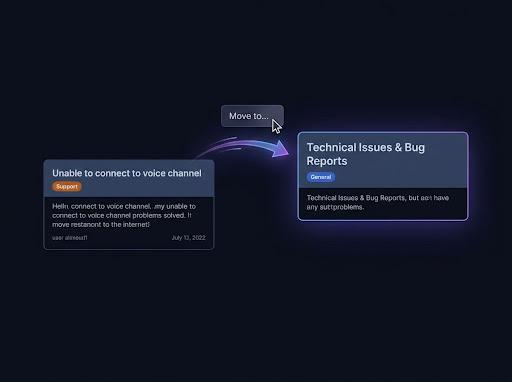
Every channel's history
Pippin copies each text, announcement, forum and media channel from its first message, with threads and forum posts. The originals stay.
Copy a Discord server
To copy a Discord server with its messages, add Pippin to both servers and run /copy-server in the server you want to copy. Pippin copies every text, announcement, forum and media channel, with threads and forum posts, from the first message, and the originals stay. Discord can't copy messages itself. For the same roles and permissions, start the new server from a Discord template.
Free, every feature included: 300 moves a month plus 1,000 bonus moves to start. One run has no message limit.
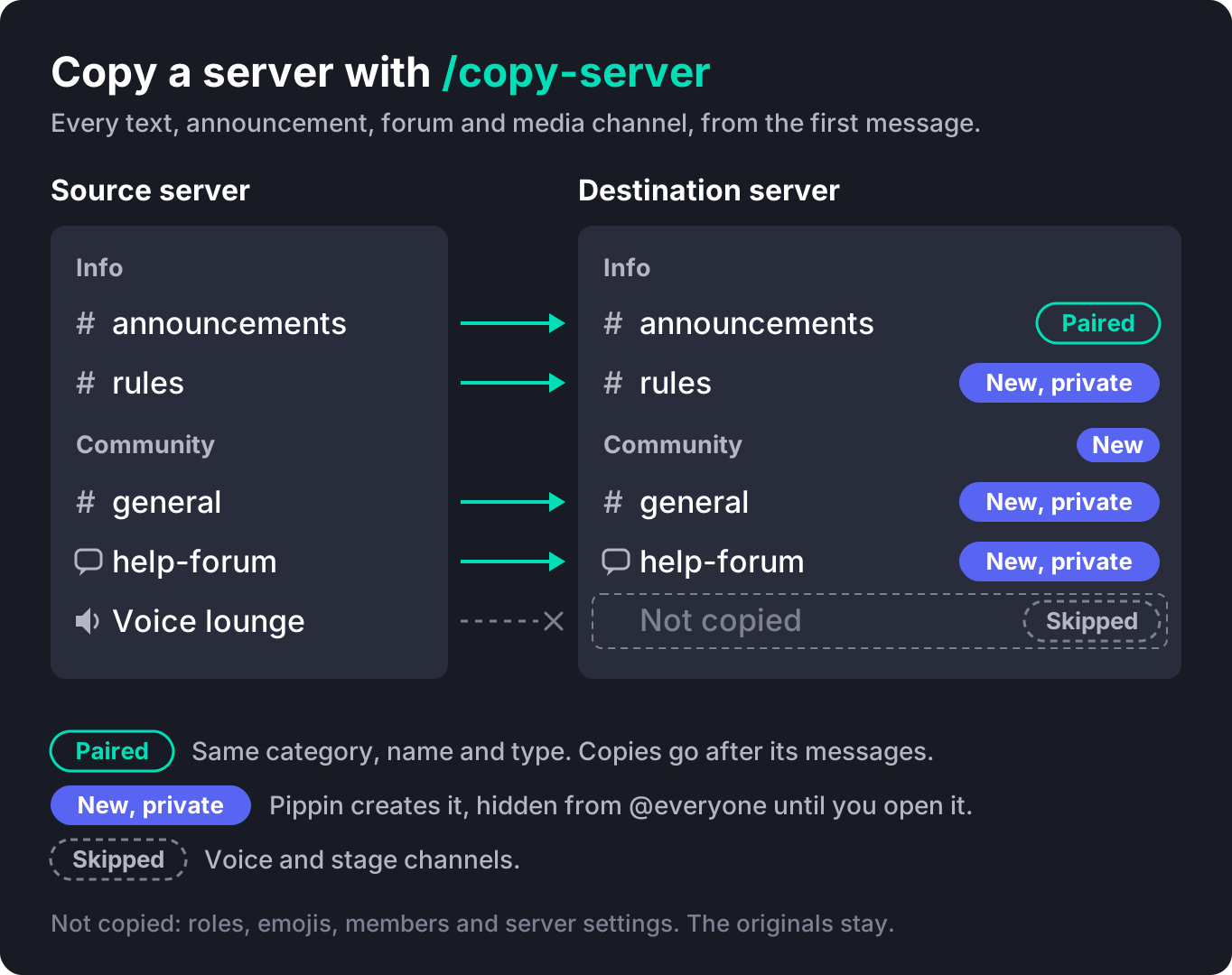
Pippin copies each text, announcement, forum and media channel from its first message, with threads and forum posts. The originals stay.
Each copy shows the original author's name and avatar. Files and embeds come with the message, and Pippin re-adds reactions.
Discord's server templates copy roles, permissions and channels but no messages. Start from a template, then copy the messages with Pippin.
Pippin copies the parts Discord can't: every channel's message history. Structure that a Discord template already handles, like roles and permissions, comes from the template.
Originals stay. Pippin never creates or deletes servers, and source and destination must be different servers. To copy just one channel, use /copy-channel.
Each channel copies from its first message up to the newest message when the run started. It follows edits and deletes of the originals while it runs, does one catch-up pass, then stops.
Members can't be moved by any bot. Invite them to the new server.
To move only some messages, use Move cross server. Before you start, check the permissions Pippin needs in both servers.
If you want the same roles and permissions, make a Discord server template of the source. Select 🧱 Create template on the /copy-server panel (Pippin needs Manage Server on its role for this), or make one yourself in Server Settings → Server Template. Open the discord.new link and create the new server. A template copies no messages.
Pippin must be in the server you copy from and the server you copy into. You need Manage Server in both. Pippin can't create a server, so create the destination first or use one you already have.
The panel shows how many channels Pippin copies and skips. Use 🧩 Content to choose what happens to long messages, large files and stickers, and 📅 Day dividers to show original dates.
Run the /feed-link command Pippin gives you in the destination server, with the same Discord account, within 10 minutes. The code works once.
✅ pairs with an existing channel, 🆕 is a new private channel, ⏭️ is skipped, and ⛔ is not copied, with the reason. Fix any ⛔ you care about first.
Confirm shows your choices, the source server's move balance and an estimated move total. Follow progress in the panel or with /status.
Pippin's new channels start private. Check each one, then open it to members.
Pippin pairs channels by category, name and type, ignoring case. A matching channel is never cleared: the copied history posts after its existing messages. Channels with no match are created as new private channels.
Every channel Pippin creates is hidden from @everyone. Only you and Pippin have access, plus server administrators, who can see every channel in Discord. Open each one to members when you've checked it.
An age-restricted channel copies only into an age-restricted channel. A new channel for one is age-restricted too, and a mismatch shows ⛔.
A channel also shows ⛔ for duplicate names in the destination, a destination already used by another copy, missing access, or Discord's channel limits. Fix the reason, then copy that channel later with /copy-channel.
Every plan can copy a whole server, Free included. Each copied message costs 1 move, more if a long message is split. Only the source server pays. Creating channels and threads is free, and the destination's moves are not touched.
If moves run out, the copy pauses and continues by itself within about a minute of a top-up.
One run has no message limit, and Pippin sets no limit on channels or history age. Moves are still counted: Free has 300 moves a month plus 1,000 one-time bonus moves, Starter has 1,500 a month, and Unlimited has no monthly move cap. Discord allows up to 500 channels per server and 50 per category.
A server copy takes one copy slot in each server. If either server has no free slot, Pippin refuses and shows an upgrade link.
Pippin doesn't store backups or export a file. What it can do is copy every channel's history into a second server you control, so the messages, authors and files exist in two places.
The copy is a point-in-time copy: once a channel finishes, later posts and edits in the source don't reach it. To keep copying new posts afterwards, set up a feed with /feed.
Keep the backup server private, check who can see it, and repeat the copy into fresh channels when you want a newer snapshot.
If you need a restorable snapshot of roles and settings, use a backup bot such as Xenon.
Many Discord server cloner tools on GitHub log in with your personal account token instead of a bot. Their own READMEs say this breaks Discord's rules.
Pippin is a regular Discord bot. You add it to both servers, it needs no account token, and it posts copies through webhooks.
How Pippin helps
Pippin posts each copy through a webhook, so it shows the original author's name and avatar.
Threads keep their names, and private threads stay private. Forum and media posts keep their tags, matched by name.
Files and rich embeds come with each message. Pippin re-adds reactions: the emoji shows, the original counts don't.
Each channel follows edits and deletes of the originals while it runs, does one catch-up pass, then stops.
Pause (⏸️) works in either server, and each running channel finishes its current message. Resume (▶️) works only in the source server and shows a new /feed-link command to run in the destination. Cancel (🛑) works in either server and keeps the channels and copies made so far. A cancelled server copy can't resume.
Run /status, then pick the server copy in Open a copy…. Progress shows N of M channels finished and updates every 15 seconds. Finished server copies stay listed for seven days.
🔁 Retry tries a refused channel or category creation again. ⏭️ Skip channel stops that channel only.
Pippin's audit log records when a server copy starts, pauses, resumes, is cancelled and finishes.
Join the Pippin Discord to try message, thread, forum-post, and conversation moves in a live test environment. No subscription or credit card, and it doesn't use your server's moves.
 Join & try for free
Three tools come up when you look for a Discord server copier. Each one copies a different part of a server.
| Discord server template | Xenon (checked 19 Nov 2026) | Pippin /copy-server | |
|---|---|---|---|
| Roles and permissions | Yes | Yes, free | No. Use a template first |
| Channels and categories | Yes (layout only) | Yes, free | Yes, created or paired |
| Messages | None ("A template copies no messages") | Premium only: the most recent 50, 100 or 250 per channel, by plan | Every channel's history from the first message, every plan including Free |
| Threads and forum posts | No messages | Premium only | Yes, private threads stay private |
| Into a server that already has content | Creates a new server | Loading "replaces channels and roles by default" | Pairs by name and type and adds after existing messages; never clears a channel |
| Attachments | No | Restored only if the backup is under 24 hours old, the original message still exists and the files are under 8 MB | Files are posted at copy time; a file too big for the destination is left out |
| Emojis and stickers (server assets) | Not covered here | Premium 2 and 3 | Not copied |
| Stored snapshot to restore later | No | Yes, backups are stored | No. The copy is a second server |
| Cost | Free | Free for structure; Premium $5.99, $10.99 or $15.99 a month | Free plan included; 1 move per message from the source server |
Xenon also copies roles, bans and nicknames, and keeps stored backups you can load later. Pippin doesn't. Use Xenon or a template for structure, and Pippin when you need the full message history.
Xenon cells checked 19 Nov 2026 on xenon.bot/clone (“Xenon clones channels, roles, permissions, and settings for free. Messages, bans, and nicknames need Premium. Members don't come across.” and “Loading replaces channels and roles by default.”), xenon.bot/premium (“A plan that saves 250 messages per channel saves the most recent 250 in every channel it backs up”), Xenon attachment limitations (“An attachment can only be restored if the backup is less than 24 hours old, the original message still exists, and the files in that message add up to less than 8MB.”), xenon.bot/backups and Xenon Premium docs (last updated Nov 9, 2026). Pippin cells are from docs.pippin.gg.
Yes. Discord's server templates copy roles, permissions and channels but no messages. Pippin's /copy-server copies every text, announcement, forum and media channel's history into another server, from the first message, with authors, files, threads and forum posts. The originals stay.
Yes, in two parts. Create the new server from a Discord template of the old one for roles, permissions and channels. Then add Pippin to both servers and run /copy-server in the old one to copy the messages. Members don't move; invite them.
No. Pippin copies categories, channels (name, topic, slowmode, age restriction and forum tags) and messages. Roles and permissions come from a Discord template. Custom emojis, the server sticker collection, the icon, the banner and server settings are not copied.
Pippin pairs channels by category, name and type, ignoring case. A matching channel is never cleared: the copied messages post after its existing history. Channels with no match are created as new private channels that only you and Pippin can open until you share them.
Every plan can run /copy-server, Free included. Each copied message costs 1 move, more if a long message is split, charged to the source server. Creating channels and threads is free. If moves run out, the copy pauses and resumes within about a minute of a top-up.
One run has no message limit, and Pippin sets no limit on channels or history age. Moves are still counted. Discord's own limits apply: 500 channels per server and 50 per category. Voice and stage channels are skipped.
Tools that log in with your account token are self-bots, and their own READMEs say that's against Discord's Terms of Service. Pippin is a regular Discord bot added to both servers, with no account token.
You need Manage Server in both servers, and Pippin must be in both. In the destination, Pippin needs Manage Webhooks, Send Messages, Embed Links and Attach Files, plus Manage Channels if it creates channels.